Anthropic released Claude Fable 5.2 today, November 9, 2026, and calls it its best model for designing things on screens: interactive 3D, simulations and animation in code. A game is a fair test of that claim. You can tell in two seconds whether it looks good and in ten whether it feels good.
So we asked for one, and asked for it to look and move like a premium game. Fable 5.2 wrote 1,804 lines, including its own WebGL shaders, played its own game in a test browser, fixed what it saw and put the result on a server. It is live: play Orbit Hop. Open it on a phone and tilt the phone after you tap Play.
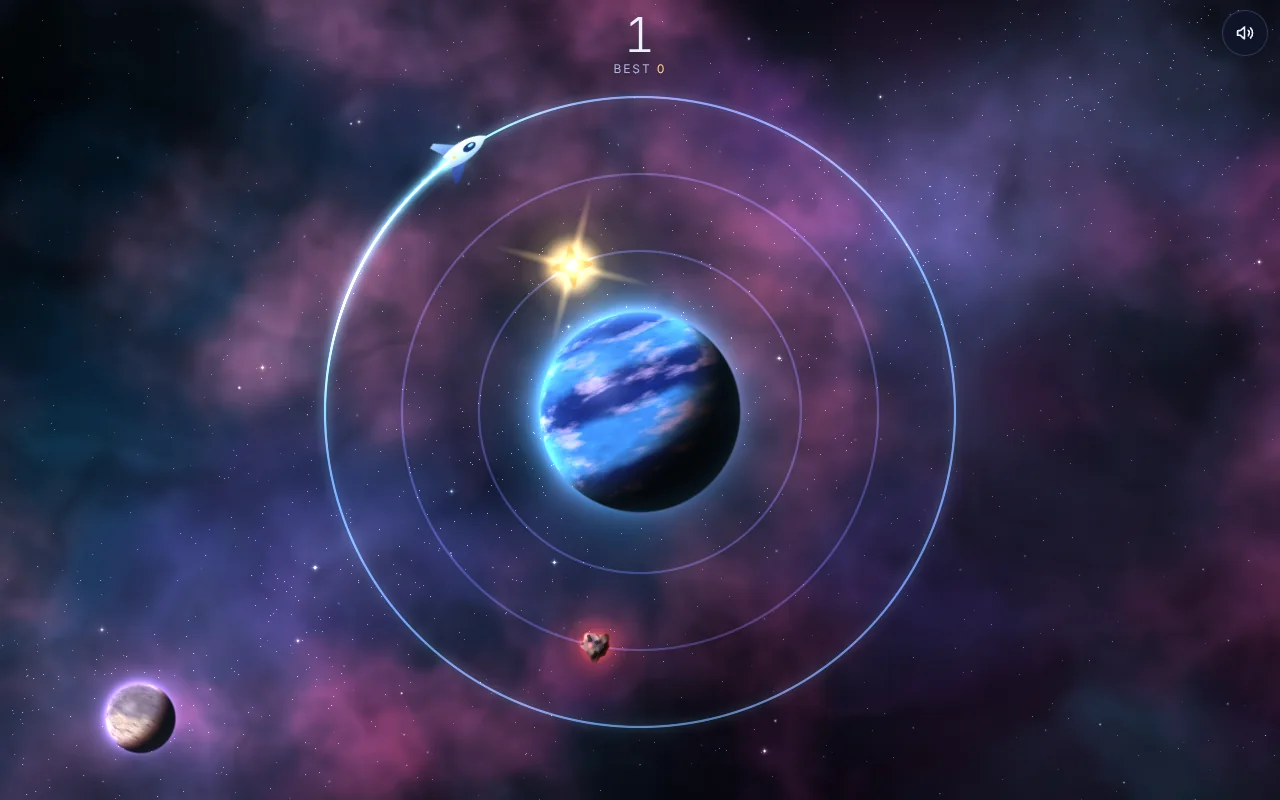
We kept our first draft online too. It is a plain version of the same game, made with Claude Opus 5.5 earlier the same day: play the first draft. Open the two side by side, and the difference between the models is the difference you see.
This guide shows what Fable 5.2 built, how it compares with the draft, the exact prompt, what happened on the server call by call, and how to do the same with your own idea.
On this page: Quick answer · Fable 5.2 in one minute · What it built · Draft and final, side by side · Why a server · Step 1: Connect · Step 2: Describe it · Step 3: Build and go live · Measurements · Step 4: Change it · Step 5: Leaderboard · Step 6: Who can play · Troubleshooting · FAQ
Quick answer
To have Claude make a mini game and put it online:
- Connect Server4Agent to Claude as a custom connector, then sign in. There is no API key to copy.
- Pick a model. Claude Fable 5.2 when the look and the motion matter, Claude Opus 5.5 for a quick, plain one.
- Describe the game and how it should look and feel, and end with "put it on Server4Agent and send me the link."
- Claude writes the game to a server, starts it and deploys it. You get an address on
apps.server4agent.comthat anyone can open. - Keep asking for changes. The link stays the same, and the game keeps running after you close the chat.
Key takeaways
- Claude Fable 5.2 came out on November 9, 2026, on the Pro, Max, Ultra, Team and Enterprise plans.
- One prompt produced a game that looks designed. A nebula, a lit planet with an atmosphere, glowing trails and synthesized sound, all drawn in code. The page downloads no images, fonts or sound files.
- It tested its own work. Fable 5.2 played the game in a test browser at phone and desktop sizes and went through three rounds of fixes from its own screenshots before it shipped.
- About 37 minutes from the prompt to a live link: 12 to write the first full draft, 19 to test and fix it, and under 6 to put it online.
- The server part is four calls:
create_project,write_file,start_appanddeploy. Together they took about 20 seconds of server time. - A server can do what a page cannot. A 111-line Python file added a top 10 that every player shares, at the same address.
- Private until you say so. A new project serves nothing until it is deployed, and you can keep a game to your team or behind a password.
Key facts
| Model | Claude Fable 5.2, released November 9, 2026 |
| Play the Fable 5.2 build | orbit-hop-2-367.apps.server4agent.com |
| Play the first draft | orbit-hop-first-draft-6aa.apps.server4agent.com |
| Plans with Fable 5.2 | Pro, Max, Ultra, Team and Enterprise |
| The game | One HTML file, 1,804 lines, 74.6 KB, no libraries |
| Graphics | WebGL, with a plain canvas version for devices without it |
| On a phone | Tilting shifts the background layers by depth |
| Connect address | https://mcp.server4agent.com (sign in, no API key) |
| Calls to go live | create_project, write_file, start_app, deploy |
| Prompt to live link | About 37 minutes, testing included |
| Leaderboard | One Python file, standard library only |
| Who can play | Anyone with the link, your team only, or anyone with a password |
Claude Fable 5.2 in one minute
Fable 5.2 follows Fable 5.1 as Anthropic's most capable model for technical work. Anthropic calls it its best model for designing objects "for the real world and on screens," and says it can build interactive 3D worlds, simulations and animations in code. Through the API it costs $8 per million input tokens and $40 per million output tokens, down from $10 and $50 for Fable 5.1.
In the Claude apps it is available on paid plans from launch day, and Anthropic is giving eligible paid plans extra Fable usage to try it.
What Fable 5.2 built
Orbit Hop is a one-button game. A probe circles a planet on its own, a tap hops it to the next of three orbits, and you collect stars and dodge rocks while everything speeds up. The rules fit in a sentence. What the prompt asked for was the rest, and this is what came back, all in one file:
- A deep-space backdrop drawn in code. A nebula with a faint galactic band and dust lanes, 560 twinkling stars at three depths, a far moon lit from the same side as the planet, and now and then a shooting star.
- A planet with real lighting. Every pixel is shaded as part of a sphere: a soft line between day and night, warm light along that line, cloud bands that drift, and an atmosphere that glows at the rim.
- Smooth motion. The game advances in fixed steps, 120 a second, and draws in between them, so movement stays even on any screen. Hops ease in with a slight overshoot, and the probe banks into them. The camera glides from the title into play.
- A crash you feel. Time slows for a moment, the screen flashes, shockwaves spread and the probe bursts into particles.
- Tilt. On a phone, tilting it shifts the background layers by depth, like looking through a window. iPhones ask for motion access once, when you tap Play. On a computer the mouse does the same, gently.
- Sound made in code. A soft pad, a hop note pitched by orbit, pickup chimes that climb a scale, and a low crash. There is a mute button, and the game remembers it.
- Fallbacks. It uses WebGL2, drops to WebGL1 with the same shaders, and drops to a plain canvas version of the same scene on a device with neither. It lowers its own resolution and detail when frames run long.
- Respect for the player. If your device is set to reduce motion, the tilt effect and the screen shake are cut to about an eighth. Buttons are large enough for a thumb, and the score is announced to screen readers.
The game's own code takes 0.15 to 0.3 milliseconds a frame in our test browser, out of the 16.7 a screen allows at 60 frames a second. A test browser cannot tell you how fast a real phone's graphics chip is, which is why the game adjusts its own quality as it runs.
Which Claude model to use for a game
We built this game twice on launch day, and both versions are online, which makes for an honest comparison.
| Claude Opus 5.5 | Claude Fable 5.2 | |
|---|---|---|
| Play it | The first draft | The Fable 5.2 build |
| What we asked for | A small game in one file | The same game, looking and moving like a premium one |
| What we got | 584 lines, 18.7 KB | 1,804 lines, 74.6 KB |
| Graphics | Flat shapes on a 2D canvas | WebGL shaders, lighting, particles, sound |
| Time | Online 89 seconds after the first server call | About 37 minutes from the prompt, testing included |
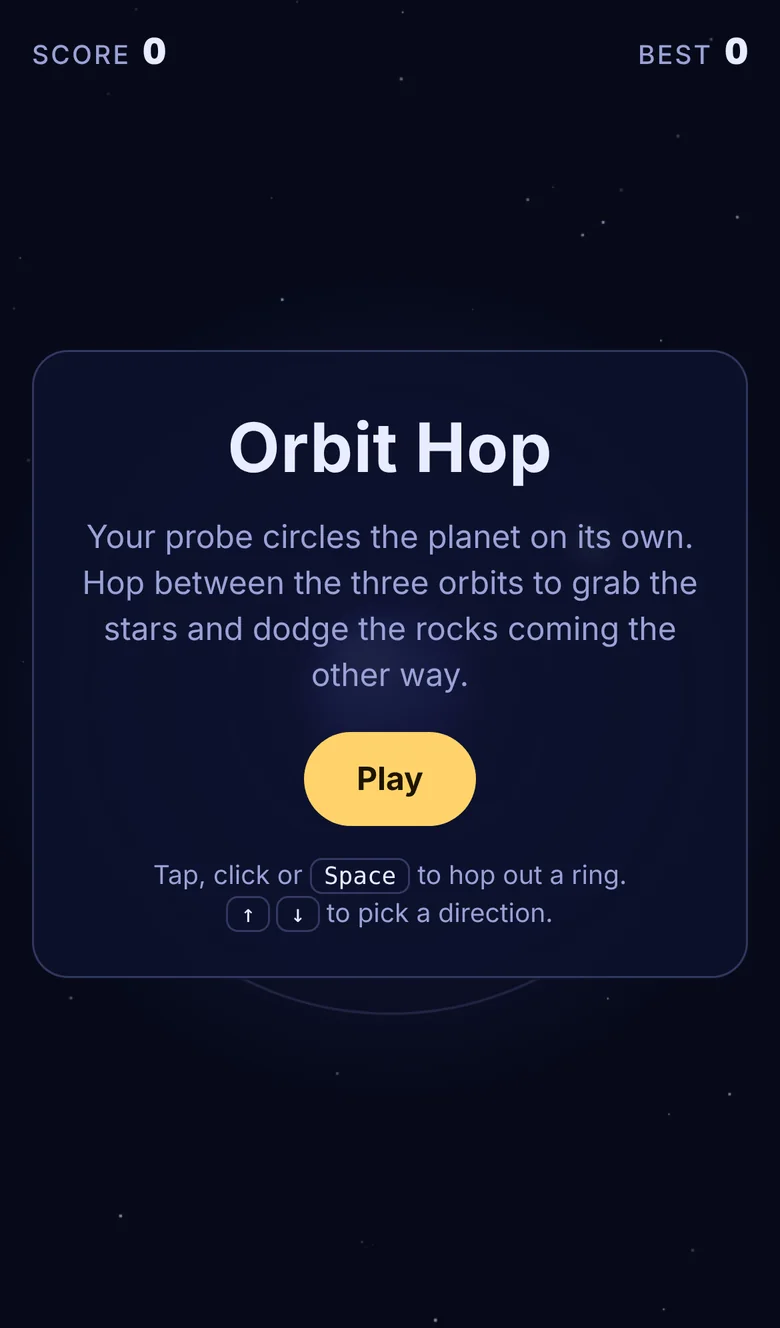
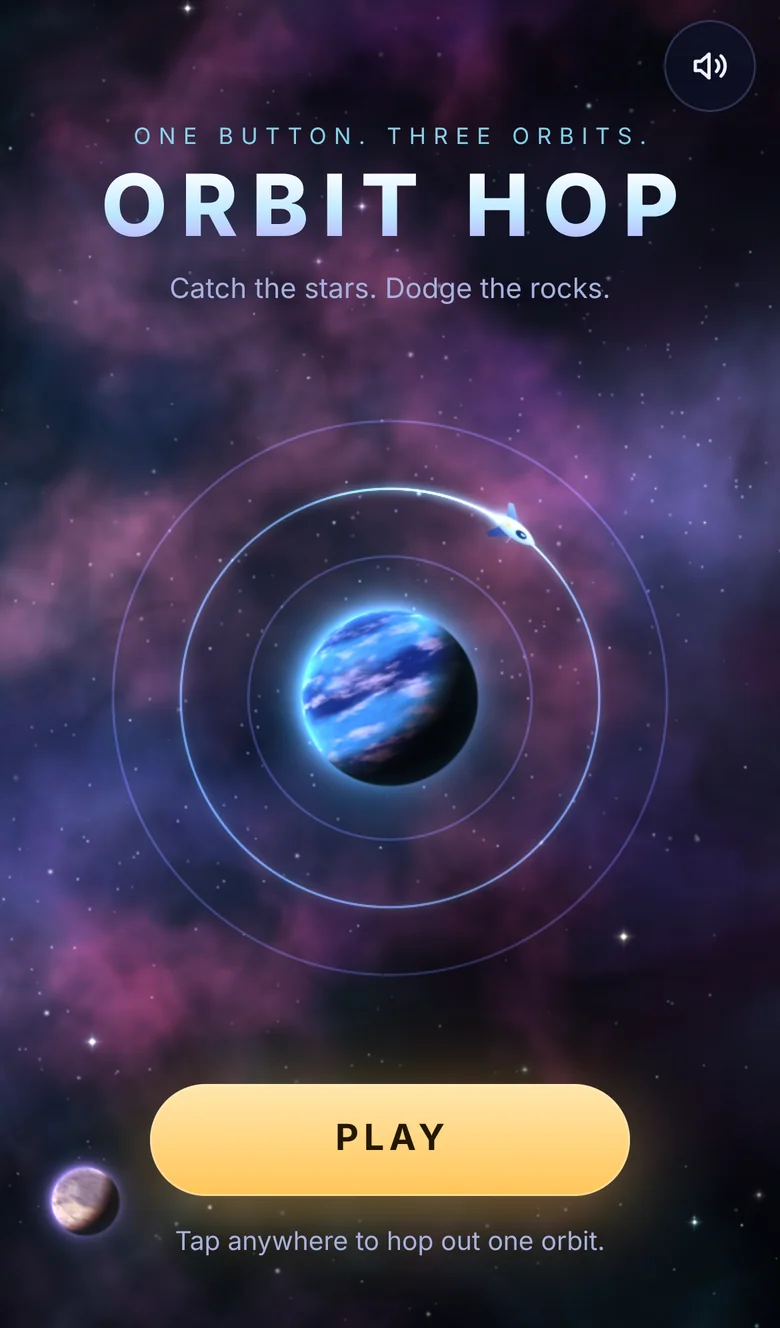
The same title screen from each, on a phone:
And the same game a few seconds in:
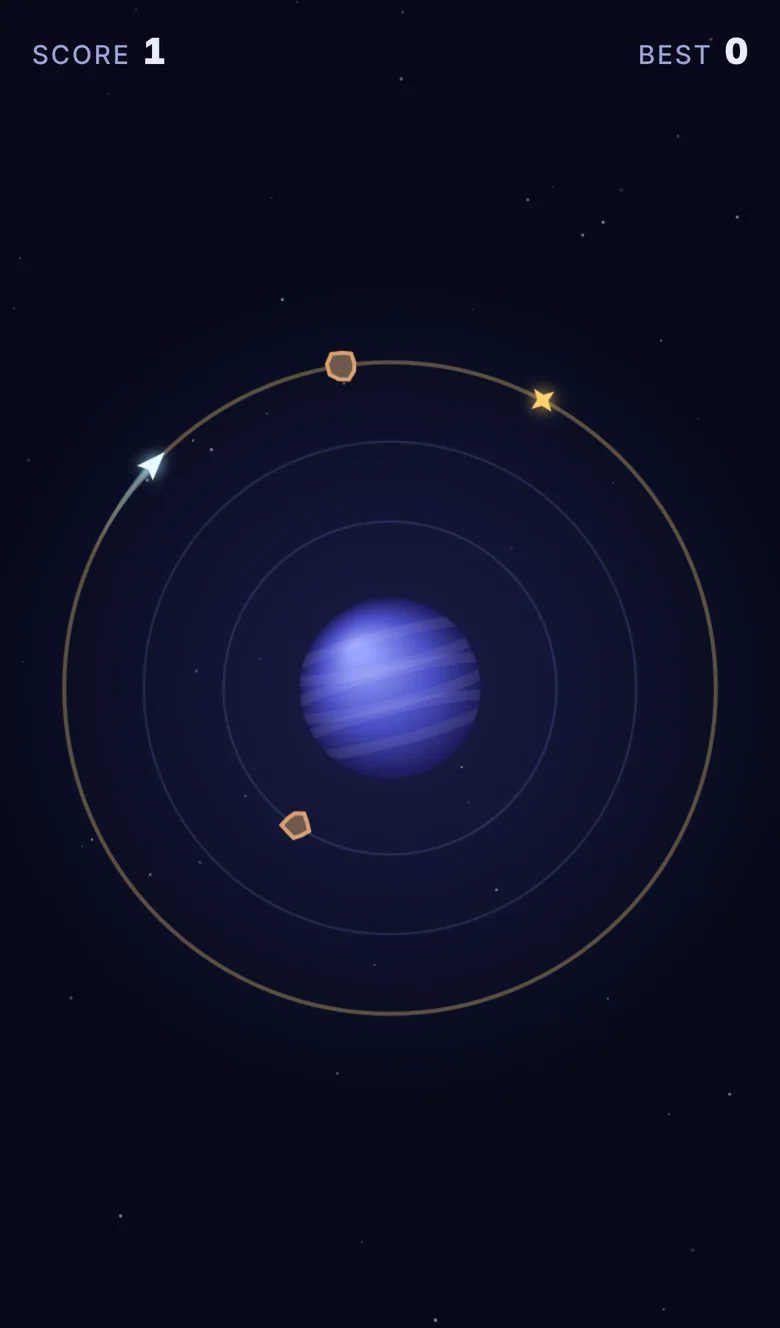
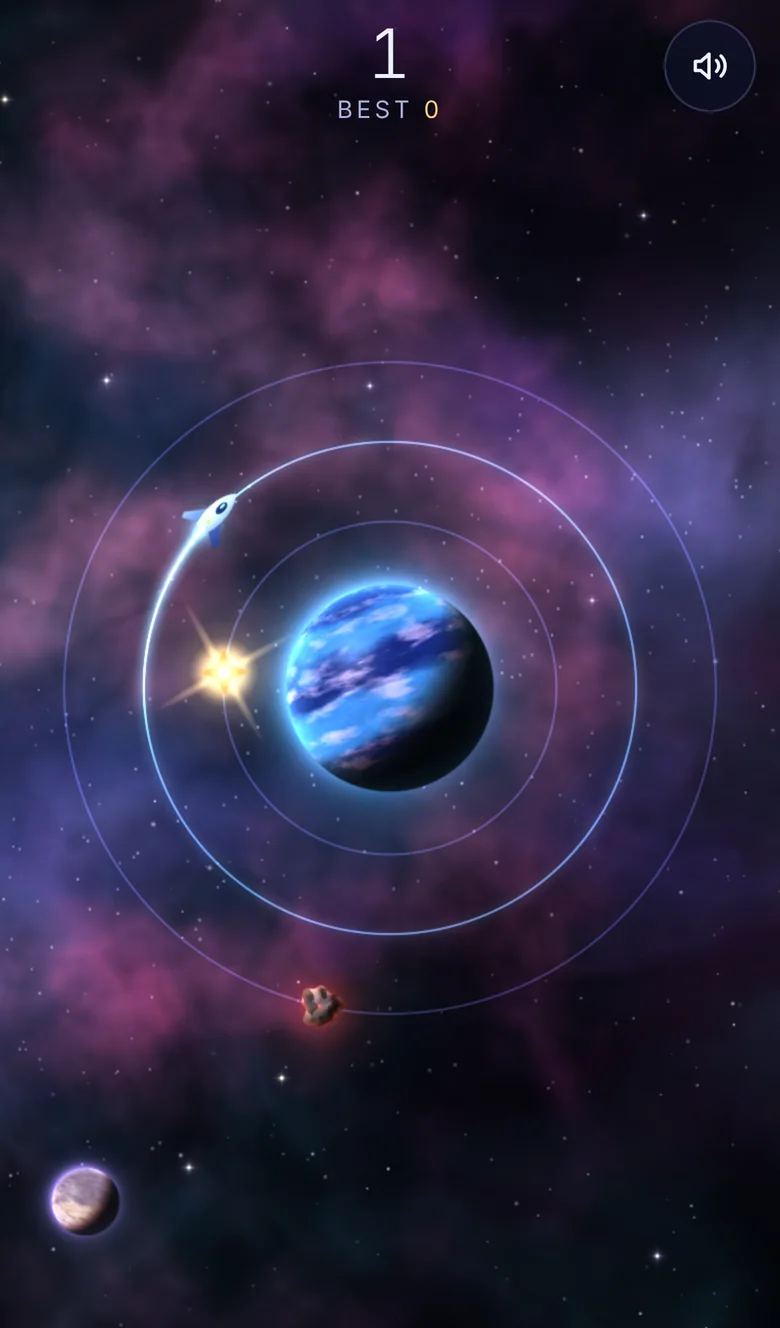
The rules are identical. Fable 5.2 started from the draft's rules and rebuilt everything you see and hear. Open both links and compare:
- The first two seconds. The draft opens on a card of instructions. The Fable build opens on a scene, with the probe already in orbit.
- A hop. In the draft the probe slides straight to the next orbit. In the Fable build it eases out, overshoots a little and banks.
- A crash. The draft throws sparks and shakes the screen. The Fable build slows time, flashes, and sends out shockwaves.
- Depth. The draft has dots for stars. The Fable build has a nebula, stars at three depths and a far moon, and they shift when you tilt your phone or move the mouse.
- Sound. The draft is silent. The Fable build plays a note for every hop and a chime for every star.
- The score. The draft keeps your best on your device. The Fable build adds a top 10 that every player shares.
Anthropic itself recommends starting with Claude Opus 5.5 for everyday coding and keeping Fable for harder, open-ended work. For games that splits cleanly:
- To try an idea, Opus 5.5 is quick and more than enough. Save your Fable usage.
- To make it worth sharing, reach for Fable 5.2: lighting, motion that feels right, 3D, physics, or a game big enough to need levels.
The steps below are the same either way. The model decides what code Claude writes, not how it ships: every Claude model makes the same four Server4Agent calls.
Why put the game on a server
The game Claude shows you in the chat is the quickest way to try an idea, and for a single quick share that may be all you need. Put it on a server when you want any of these:
- Its own address on
apps.server4agent.comthat works for anyone, whatever assistant they use, or none. - Code that runs on the server, in any language. That is what makes a shared leaderboard, saved games or a turn-based multiplayer API possible.
- A choice of who can play: everyone, only your team, or anyone with a password.
- Edits from anywhere. The project lives on the server, so you can change it from a new chat, and teammates can change it from their own assistant.
- It keeps running after you close the chat. A game with a backend keeps answering.
Step 1: Connect Server4Agent to Claude
In Claude, open Settings, then Connectors, then Add custom connector. Paste https://mcp.server4agent.com, click Connect and sign in to Server4Agent. There is no API key to copy. The integrations page has the same steps with a picture of what it looks like once it is connected.
If your company is on Claude's Team or Enterprise plan, an admin can connect everyone at once, so you skip this step. See automatic sign-in from Claude.
The same connector works from ChatGPT, Cursor and other MCP hosts, so the game is not tied to the app you built it in.
Step 2: Describe the game
Choose Claude Fable 5.2 and describe the game. This is the brief behind Orbit Hop. Paste it as it is, or swap in your own idea:
Build an original one-button browser game called Orbit Hop, and make it look
and move like a premium game. Then put it on Server4Agent and send me the link.

Gameplay: a probe circles a planet on its own. One tap hops it out to the next
of three orbits, and the outer orbit wraps back to the inner one. Collect
stars, dodge rocks coming the other way, and let it speed up over time.

Look and feel: a deep-space scene with real depth: nebula, layered stars,
a lit planet with an atmosphere, glowing trails and particles. Every motion
eased and smooth at 60 frames a second, on a phone too. On a phone, tilting
it should shift the background layers, like looking through a window.

One HTML file, no outside libraries, touch and keyboard, best score kept on
the device.
What makes a game brief work:
- Say what one tap or key does. Controls are where a first version most often goes wrong.
- Name the goal and how you lose. "Collect stars, hit a rock and it is over" is a whole game design.
- Describe the look in layers. "Nebula, layered stars, a lit planet" gets you depth. "Make it pretty" gets you a gradient.
- Say how it should move. Eased, smooth and a frame rate. Motion is most of what makes a game feel finished.
- Ask for one file and no libraries. There is nothing to install, so it goes live in seconds.
- Describe your own idea rather than naming a famous game. An original game is yours to share.
Step 3: Claude builds it and puts it online
This is what happened in our run on November 9, 2026.
It wrote the game. The first full draft took about 12 minutes.
It tested the game. We ran Fable 5.2 as an agent with its own sandbox and a test browser, so it could play before it shipped. It played at phone and desktop sizes, looked at its own screenshots and fixed what it saw, three rounds in all. Then it checked the cases a quick look misses: a device with no WebGL, a phone on its side, reduced motion, a tab left in the background, and tilt, using simulated sensor readings. That took about 19 minutes. In a chat with no sandbox, Claude writes straight to the server and you are the tester: you get the link sooner, and you reply with what you see.
It put the game online. These are the calls, and you type none of them:
list_serversfinds a running server with room for another project. We pointed it at one we already had. On a new account, Claude callscreate_serverfor a small one instead, which takes a minute or two to start.create_projectmade a private project and returned its id, its address and itslisten_port, the port that address is routed to. It answered in 0.42 seconds. The name Orbit Hop was taken on that server by our first draft, so the call was refused, and Fable 5.2 picked Orbit Hop 2. That is why the address has a 2 in it.write_filesaved the game aspublic/index.html: 1,804 lines and 74.6 KB of HTML, CSS, JavaScript and shader code.execran a checksum of the file on the server, which Fable 5.2 compared with the copy it had tested. What went live is byte for byte what it tested.start_appran the game with Python's built-in web server, the command shown below. Every Server4Agent box already has Python, so there was nothing to install, and the app answered on the first call.deploychecked that something was listening, made the project public and checked the address. It came backliveon the first call.
This is the whole start command:
python3 -m http.server $PORT --bind 0.0.0.0 --directory publicServer4Agent sets PORT for the app, records the command so the game comes back after a restart, and waits for the port to answer. The command serves the public/ folder and never the project folder itself, which is where Server4Agent keeps a project's secrets.
From create_project to a live link took 5 minutes 37 seconds. The calls themselves took about 20 seconds together. The rest was Claude sending the 74.6 KB file, because a model writes a file out piece by piece.
What we measured
All from one run on November 9, 2026, on a server we already had running.
| Step | What happened | Result |
|---|---|---|
| First full draft | Fable 5.2 wrote the game | About 12 minutes |
| Testing and fixes | Three rounds from its own screenshots, plus fallback, tilt and landscape checks | About 19 minutes |
create_project | A private project with its own address | 0.42 seconds |
write_file | public/index.html, 1,804 lines | 74.6 KB |
start_app | Python's built-in web server | Listening on the first call |
deploy | Made the project public and checked the address | live on the first call |
| First page load | From our test machine | HTTP 200 in 0.48 seconds |
| Prompt to live link | Everything above | About 37 minutes |
After it went live, we ran our own check on the public link, at a phone size and a desktop size, with no errors in either. The only requests the page makes are for itself and for the leaderboard.
Step 4: Change it from the chat
Play it, then say what is wrong or what you want next:
- "The rocks are too fast for the first ten seconds."
- "Give the planet a ring, and make the far moon bigger."
- "Add a second kind of star that slows time for three seconds."
Claude writes the new version over the old one. For a game made only of files, the change is live on the next reload. When Claude changes code that runs on the server, it calls start_app again to restart it. The address never changes, so a link you have already shared keeps working.
You can also come back days later in a new chat: "Open my Orbit Hop project on Server4Agent and make the stars bigger." The project is on the server, not in the old conversation.
Step 5: Add a shared leaderboard
A best score kept in the browser only knows about one player. A server can keep one list for everyone. We asked for it as a second step, so you can see exactly what changes on the server:
Add a shared top 10 leaderboard. After a game, let players save their score
with a name. Keep the scores on the server, not in the browser.
Three things changed:
server.pywent onto the server: 111 lines of Python using only the standard library. It serves the game frompublic/and adds one address,/api/scores, that lists the top 10 and accepts a new score. The scores live indata/scores.json, outsidepublic/, so the file itself can never be downloaded. We already had this file from the first draft of the game, written with Claude Opus 5.5, and Fable 5.2 kept it as it was. A small job did not need the bigger model.- The game-over screen got a name box and the top 10, built by Fable 5.2 to match the rest of the game. The page grew to 1,924 lines.
start_appran again withpython3 server.py. That replaced the plain web server on the same port, so the address stayed the same and the board appeared on the next page load.
Putting the board live took 5 minutes 16 seconds, nearly all of it sending the bigger page.
A few details are worth asking for whenever a game saves anything:
- Names are cut to 12 characters and shown as text, never as HTML, so nobody can inject a script through their name.
- Each visitor can save one score every three seconds, and impossible scores are refused.
- This is a casual leaderboard. The browser reports the score, so a determined player can send a fake one. A cheat-proof board needs the server to check the game itself, which is a much bigger job. For a game you share with friends, the simple version is the right one.
The same pattern, a small server next to the game, gives you saved progress, daily challenges or a turn-based multiplayer game.
Step 6: Choose who can play
A new project is private, so nothing is on the internet until it is deployed. Deploying opens the game to anyone with the link, which is what you want for a game you post. You can also tell Claude:
- "Make the game team-only." Players sign in to Server4Agent and must be on your team. Good for an office game or a work-in-progress.
- "Put the game behind the password 4417." Anyone with the link and the password can play, no account needed. Good for a playtest with friends.
- "Make it private again." The address stays reserved, and nothing is served until you open it again.
The guide to sharing without going public covers these options in more detail.
Troubleshooting
The link shows nothing, or says the project is private. Projects are private until they are deployed. Tell Claude: "Deploy it."
The link does not load the game. Nothing is listening on the project's port, usually because the app stopped or the start command was wrong. Ask Claude to read the app's logs on Server4Agent and start it again.
Claude does not use Server4Agent. Check that the connector is connected and switched on for this chat, and name it in the prompt: "Put it on Server4Agent."
Tilting the phone does nothing. An iPhone asks for motion access once, when you tap Play. If you declined, the game plays the same without the effect. The effect is also turned down when the phone is set to reduce motion.
The game looks simpler on an old device. A device without WebGL gets the plain canvas version of the scene. The game also lowers its own detail when frames run long.
There is no sound. Check the mute button in the corner and the phone's silent switch. Sound starts with the first tap on Play, because browsers do not let a page play sound before that.
A change does not show up. Reload the page. If Claude changed server.py, it has to call start_app again for the change to take effect.
The leaderboard does not appear. The game hides the board when /api/scores does not answer, which means the plain web server is still the one running. Ask Claude to start the app with python3 server.py.
FAQ
Can Claude build a game and put it online?
Yes. With Server4Agent connected as a custom connector, Claude writes the game to a server, starts it and deploys it, then sends you a link on apps.server4agent.com that anyone can open. Claude Fable 5.2 built Orbit Hop this way on the day it was released.
Do I need Claude Fable 5.2 to build a game?
No. Every Claude model makes the same Server4Agent calls, so the steps are identical. We built the same game with Claude Opus 5.5 first and it played fine, in 584 lines with flat graphics. Fable 5.2 is worth it when the look and the motion matter: its version has lighting, particles, sound and tilt.
Which Claude plans include Fable 5.2?
According to Anthropic, Claude Fable 5.2 is available on the Pro, Max, Ultra, Team and Enterprise plans from November 9, 2026, and through the API with the model name claude-fable-5-2.
How long did Claude Fable 5.2 take to build the game?
About 37 minutes from the prompt to a live link: 12 minutes to write the first full draft, 19 to test it in a browser and fix what it found, and under 6 to put it online. The server calls themselves took about 20 seconds together.
Did Claude really write the graphics, with no game engine?
Yes. The game is one HTML file with no libraries. The backdrop, the planet's lighting, the particles and the sound are all code Claude Fable 5.2 wrote, and the page downloads no images, fonts or sound files.
How does the tilt effect work on a phone?
The game reads the phone's motion sensor and shifts each background layer by its depth, so near layers move more than far ones. An iPhone asks for motion access once, when you tap Play. If you decline, the game plays the same without the effect.
Do I need to install anything or use a terminal?
No. Claude does everything through the connector: it creates the project, writes the files, starts the game and deploys it. Nothing has to exist on your computer.
Is the game public as soon as it is built?
No. New projects are private until they are deployed. After that you choose who can play: anyone with the link, only your team, or anyone who enters a password you set.
Does the game keep running after I close the chat?
Yes. It runs on a server, not in the chat, and Server4Agent records its start command so it comes back after a restart. You can change it later from a new chat.
Can I add a leaderboard, saved games or multiplayer?
Yes, because the game runs on a server that can run your own code. Orbit Hop has a shared top 10: a small Python server stores scores in a file on the server, and the app was restarted on the same address.
Does building this way use my Server4Agent AI credits?
No. Claude writes the code itself through the connector, so the work counts against your Claude plan. Server4Agent's AI budget is only spent when you hand a job to the agent that runs on the server.
What does it cost to host a game?
The free plan includes one small server and one public project, which is enough for a game like Orbit Hop. Starter, at 29 dollars a month, allows three public projects, and Pro, at 99 dollars a month, allows ten.
Related reading
- Share an app you built with Claude so your team can edit it
- Your AI assistant wrote the code. How do you put it online?
- The non-technical guide to shipping real tools from chat
- Share an internal tool with your team without putting it on the internet
- How to host a Discord bot your AI assistant wrote
- Quickstart: zero to a live URL, one step at a time.
External references
- Claude Fable, Anthropic's page for the model, with plans and pricing
- WebGL, the browser's graphics API, on MDN
- Detecting device orientation, the sensor behind the tilt effect, on MDN
- http.server, the Python standard library module behind the game and its leaderboard
About Server4Agent
Server4Agent is a hosted server for AI agents. Your assistant builds a tool, site, game, API or bot on it from a plain-English request and ships it to a live URL, private by default and under a hard budget cap. Connect it from the integrations page.