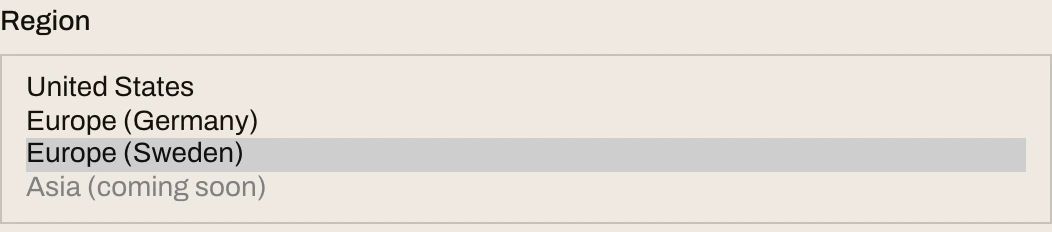
You can now choose where a Server4Agent server runs. Next to the United States there is a second region, Europe (Germany), in Frankfurt. Pick it when you create a server, and everything that server holds runs there: its files, the apps on it, the commands your AI assistant runs, and the public address people open.
We built this because teams in Europe asked for it. A dashboard full of customer names, a tool that reads internal documents, a bot that answers your staff: for a lot of companies, where that runs is the first question, not the last. Now the answer can be Germany.
Update, November 25: Europe now has two regions. Europe (Sweden) opened a day later and works exactly like Germany does here. Everything below applies to both: pick Sweden instead, and your server, its files and its apps run in Sweden.
Quick answer
When you create a server, open Region and choose Europe (Germany). Over MCP or the API, pass region: "eu" (or "se" for Sweden). Leave it out and the server runs in the United States, as before. A server stays in the region it was created in, so to move existing work to Europe, create a server there and move your projects onto it.
Key takeaways
- Servers can run in the United States or in Europe: in Frankfurt, Germany, or in Sweden.
- A server in Europe keeps its files, apps and agent runs there, and its public address is served from Frankfurt.
- The United States stays the default, so nothing changes for anyone who does not pick a region.
- Choose the region from the dashboard, from your AI assistant, or with the API.
- Your account itself, including billing, prompts and run history, stays in the United States.
What runs in Germany
When you pick Europe (Germany), the server is placed in Frankfurt:
- Your files are stored there. The server's workspace, with every project's code and data, lives on a disk in Frankfurt.
- Your apps run there. A dashboard, a site, an API or a bot you deploy runs in Germany, and so does every command your assistant or an agent run executes on the server.
- Your visitors connect there. A public project's address,
your-project.apps.server4agent.com, is answered straight from Frankfurt, so people in Europe reach your app without a detour through another continent.
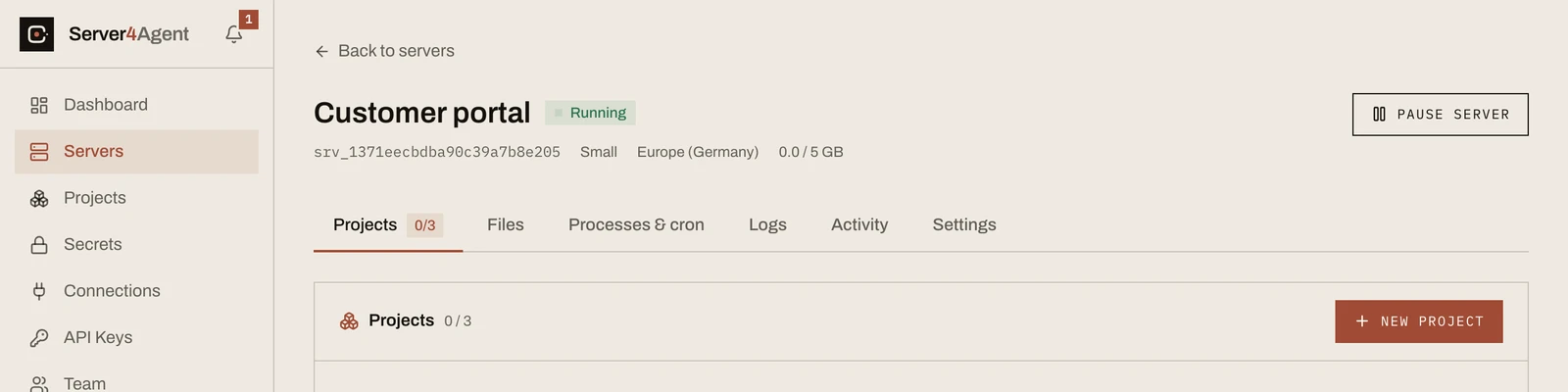
You manage it the same way as any other server: the same dashboard, the same MCP tools for your AI assistant, the same API and SDKs. The server's page shows where it runs, so anyone on your team can check at a glance.
What stays in the United States
We would rather you hear this from us than find it in the fine print. The region decides where your server runs. Your account is one account, and it lives in our United States systems wherever your servers are:
- your sign-in, team and billing details,
- the prompts you send to an agent run and the history of those runs,
- the secrets you save, which are stored encrypted with your account and handed to your server when it needs them.
So the honest way to describe a server in Europe is "this server and everything on it run in Germany", not "nothing ever leaves the EU". If your company needs the whole platform, account included, inside a cloud account of its own, that is what our Enterprise plan does. Tell us what you need.
How to choose Europe
From the dashboard. Go to Servers, choose Provision server, and pick Europe (Germany) under Region. Everything else on the form works as before.
From your AI assistant. Ask it in plain words: "Create a Server4Agent server in Europe for our customer portal." Assistants connected to Server4Agent see the region option on create_server and pass eu for you.
From code. Send "region": "eu" when you create a server:
curl -X POST https://api.server4agent.com/servers \
  -H "Authorization: Bearer $SERVER4AGENT_API_KEY" \
  -H "Content-Type: application/json" \
  -d '{"task": "customer portal", "region": "eu"}'
The SDKs take the same region value.
Moving work you already have
A server never changes region. Its files live on a disk in one place, and moving them is a copy, not a setting, so we would rather you do it on purpose than by flipping a switch. To bring a project to Europe:
- Create a new server with Europe (Germany) as its region.
- Ask your assistant to export the project from the old server and import it on the new one (
export_project, thenimport_project). For a large project, upload the exported file from the dashboard instead. - Check the secrets. A bundle carries the names of the secrets a project needs, never their values. Secrets your account already holds are connected again on their own, and anything missing is listed for you to add.
- The imported project starts private, at an address of its own. Make it public when it works, point your links at the new address, then delete the old project when you are ready.
What comes next
Asia is listed in the Region field as coming soon. It opens the same way Europe did: once servers there run end to end, and not before. A region you can pick is a region your server really runs in.
FAQ
Where exactly do European servers run?
In Frankfurt, Germany, when you pick Europe (Germany), and in Sweden when you pick Europe (Sweden). The Region field names the country, so there is no doubt which one you chose.
Does a server in Europe cost more?
No. A server costs the same in either region, on every plan. See pricing.
Can I change the region of a server I already have?
No. A server stays where it was created. Create a new server in Europe and move your projects to it, as described above.
Do my apps in Europe get a different address?
A new project in Europe gets the same kind of address as every other project, your-project.apps.server4agent.com, answered from Frankfurt. A project you move from the United States gets a new address of its own, so update any links that point to the old one.
Is my whole account in Europe if I pick Europe?
No. Your servers and everything on them run in the country you picked. Your account, billing, prompts, run history and saved secrets stay in the United States. For the whole platform inside your own cloud account, see the Enterprise plan.
Can I run some servers in the United States and some in Europe?
Yes. The region is chosen per server, so one account can have both.